


Third-party patching is one of those things that seem simple until they are not.
Most managed service providers (MSPs) have some solution, whether through their remote monitoring and management (RMM) system, scripts, or plugins. However, upon closer inspection, constant deficiencies are observed that generate risks, inconsistencies, and operational problems.
In this blog, we will review the most common mistakes managed service providers (MSPs) make with third-party patching and the patch management best practices to follow instead.
Assuming it works like Windows Update
One of the biggest misconceptions is that third-party updates behave like Windows Update.
They don’t.
Microsoft controls the Windows update ecosystem; packaging, distribution, installation logic, and rollback behavior are standardized. Third-party applications are the complete opposite. Each vendor manages updates differently, with varying installation methods, silent installation options, reboot requirements, and failure conditions.
Treating third-party updates as if they were Windows updates results in unreliable outcomes and gaps in coverage.
What to do instead:
Address third-party patching as a separate process. It requires application-level validation, visibility, and control, not just a checkbox in an RMM system.
Do not treat Line of Business applications the same way as other applications.
Line of Business (LoB) applications often receive special treatment, and not necessarily positive.
They are frequently excluded from automatic updates because they are considered “too important” or “too risky” to intervene without manual oversight. As a result, they fall behind on updates and become some of the most vulnerable systems in the environment.
Attackers do not distinguish between “standard” and “critical” applications. In fact, business applications are more attractive targets.
We have seen how quickly vulnerabilities can be exploited, sometimes within hours of their disclosure.
What to do instead:
Line of Business applications must be part of a structured patching process with controlled testing and deployment, not excluded from it.
Assuming a plugin will magically take care of everything
Many Managed Service Providers (MSPs) rely on third-party patching plugins within their Remote Monitoring and Management (RMM) system and assume the problem is solved.
In reality, most plugins:
-
- Support a limited set of applications.
-
- Lack granularity for exclusions and edge cases
-
- Provide limited insight into patch success or failure.
They can be useful, but they are not a substitute for a proper patching strategy.
What to do instead:
Understand the limitations of plugins. Patching requires more than simple deployment; it demands consistency, granularity, and a system that ensures patches are applied correctly.
Focusing solely on security (forgetting the impact on support)
Patching is often presented simply as a security function.
While security is critical, it is not the only factor to consider. Poor update management can lead to application issues, downtime, and support requests, especially at scale.
This creates tension between security and security operations:
-
- Patching too slowly → increased risk
-
- Patch too aggressively and increase support load.
What to do instead:
Balance security with operational stability. Look for repeatable deployments, test groups, and rollback functionality to ensure patches don’t create downstream issues.
Thinking RMM scripts will scale
Custom scripts are a common method for third-party patching.
They work well initially but are not scalable.
As environments grow, scripts become:
-
- Difficult to maintain
-
- Inconsistent across clients
-
- Time-consuming to troubleshoot.
What starts as a flexible solution often turns into technical debt.
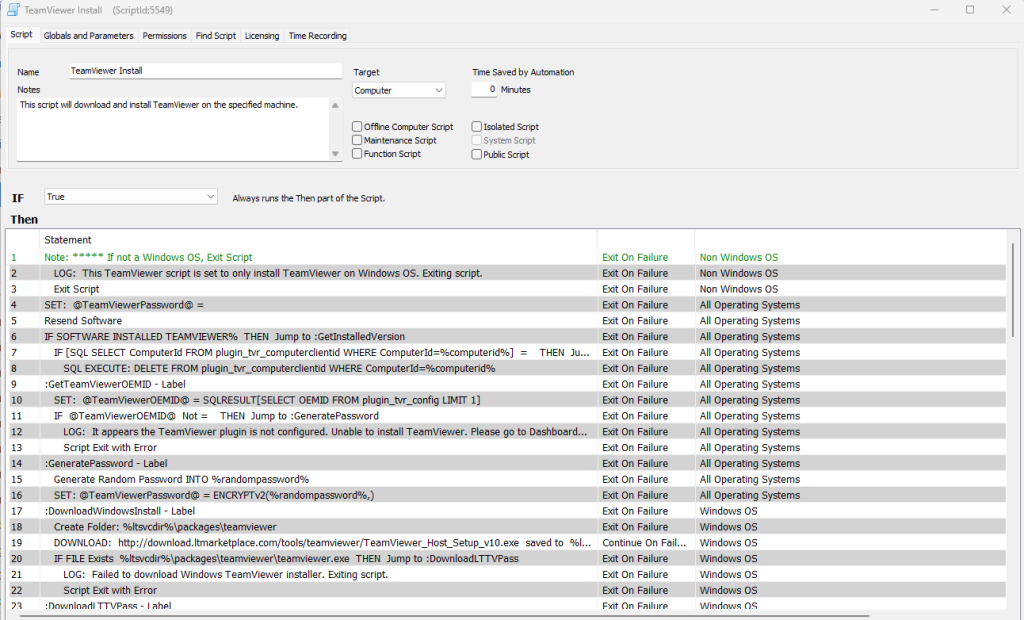
This RMM script is deploying a 2015 version of TeamViewer, a clear example of how scripts need ongoing maintenance. The command thirdpatch upgrade teamviewer will always install the latest version.
What to do instead:
As you scale, move away from heavily scripted patching strategies. Standardization and repeatability are key to maintaining consistency across environments.
The Pattern Behind These Mistakes
All these issues point to a common theme:
Third-party patching is being forced into tools and workflows that were not designed for it. And in today’s landscape, this approach proves ineffective. Exploits spread faster, attack surfaces expand, and support needs are increasingly focused on third-party applications.
The Solution for Common MSP Third-Party Patching Mistakes: ThirdPatch
ThirdPatch was specifically designed to address these common third-party patching mistakes made by Managed Service Providers (MSPs).
Instead of relying on scripts or limited plugins, it provides a structured approach to third-party patching that aligns with the actual behavior of applications.
With ThirdPatch, MSPs get:
-
- Extensive application coverage specifically designed for this purpose.
-
- Reliable deployment workflows
-
- Visibility into patch status and outcomes.
-
- A scalable system that eliminates the need for custom scripts.
ThirdPatch for MSPs
ThirdPatch is designed for Managed Service Providers (MSPs) who want to take control of third-party patching without incurring additional operational expenses.
It replaces fragmented approaches with a cohesive, scalable solution that works across different environments.
If you currently rely on scripts, plugins, or inconsistent processes, ThirdPatch offers you a clear solution.
